Fix High-End PC Stutter: Frame Time, Bottlenecks & Settings Guide
Why Does My High-End PC Stutter in Games? Decoding Frame Time & Bottlenecks
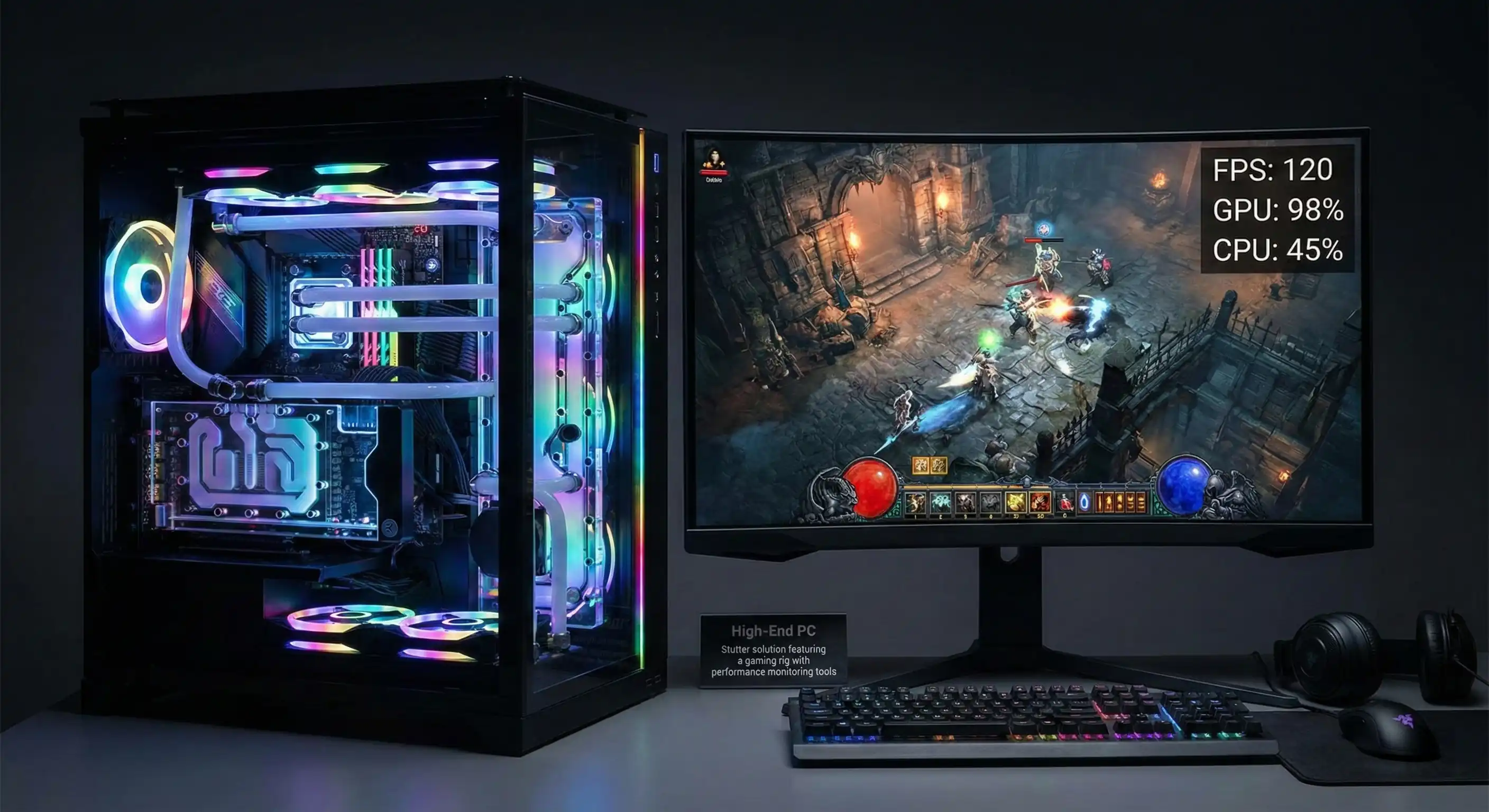
You dropped three grand on a rig. You have an RTX 4090, a top-tier CPU, and a monitor that costs more than a used car. You fire up your favorite game, expecting magic. The FPS counter screams 144, but something feels... off.
It hitches. It jerks. It lacks that buttery flow you paid for.
This is the High-End PC Stutter paradox. Nothing is more annoying than having top-tier specs and getting low-tier performance. If you're sick of generic advice like "just update your drivers," stick around.
In this guide, we dive into the real science of smoothness: Frame Time, hardware bottlenecks, and the specific Windows tweaks that actually fix PC stuttering in games. Let's turn that choppy mess into the seamless experience you deserve.
The Hidden Culprit of High-End PC Stutter: Frame Time vs. FPS
Most gamers are trained to worship the "Average FPS" counter. But here's the truth: when you're diagnosing High-End PC Stutter on a beast of a machine, average FPS is a liar.
Why High FPS Can Still Feel Laggy
Think about driving a car at an average speed of 60 mph.
- Scenario A: You cruise at a steady 60 mph for an hour.
- Scenario B: You fly at 120 mph for 30 minutes, then sit in a parking lot for 30 minutes.
Both average out to 60 mph. But one feels smooth, and the other is a nightmare. This is exactly what happens inside your GPU when you experience micro stuttering.
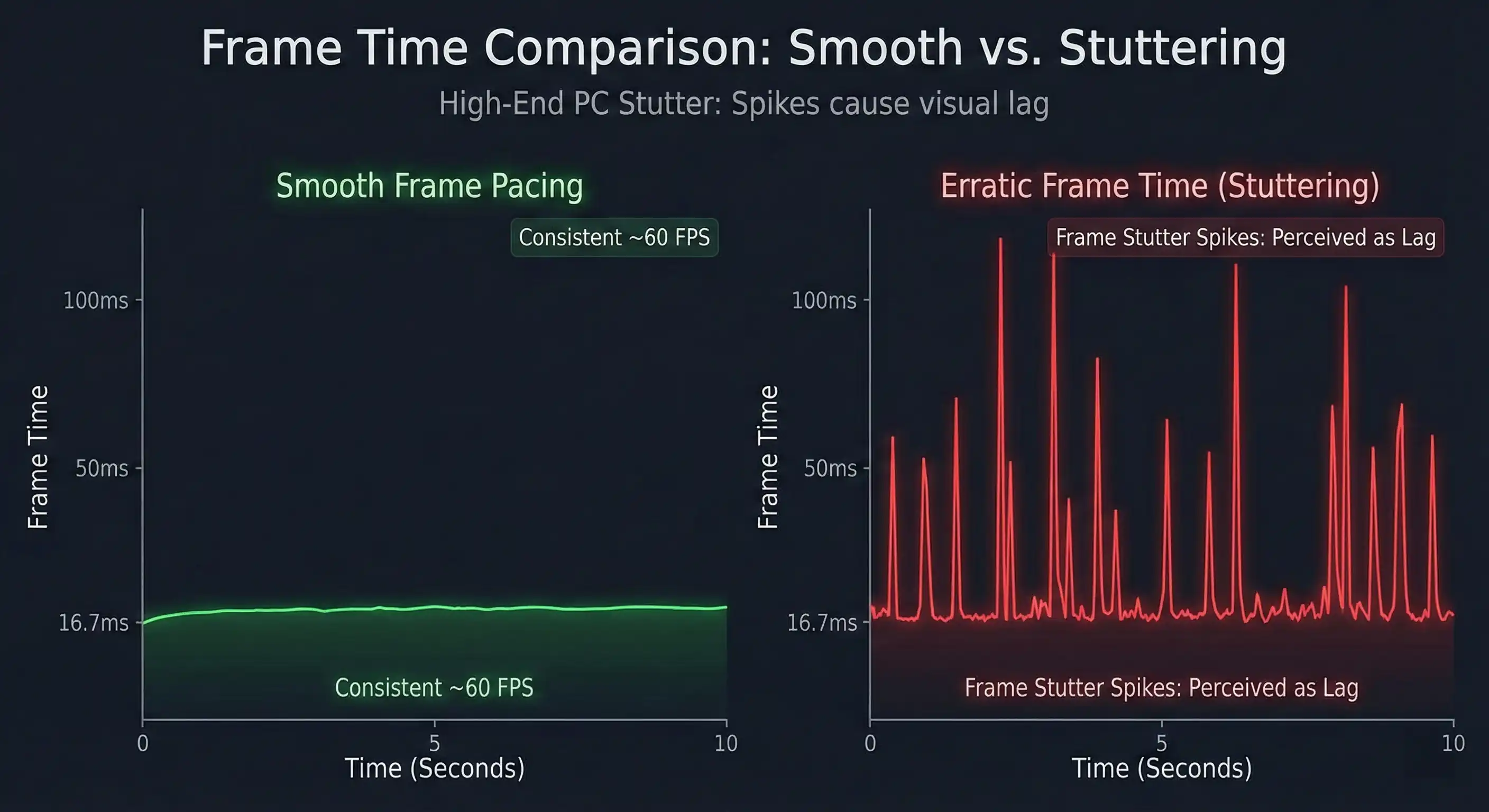
Frame Time is the milliseconds (ms) it takes your GPU to cook up a single frame. For a smooth 60 FPS, you need a new frame every 16.6ms. Perfectly. If your PC spits out 59 frames instantly but takes 100ms to render the 60th frame, your average FPS stays high, but you feel a massive "hitch."
This is poor Frame Pacing, and it ruins games.
The 1% and 0.1% Lows Explained
To catch these stutters, ignore the average. Look at 1% Low FPS and 0.1% Low FPS.
- Average FPS: Vanity metric.
- 1% Lows: The reality check. This is the average of your worst moments.
If your Average is 144, but your 1% Lows drop to 40, you have a High-End PC Stutter problem. These drops happen when it matters most—explosions, loading new zones, or spinning the camera. It breaks your immersion instantly.
How to Diagnose the Source of Your Stutter
Stop guessing. Start measuring. Before you touch a single setting, you need to know what is causing the delay.
Monitoring Tools You Need
You need a graph, not just a number.
- MSI Afterburner (with RTSS): Still the king. Version 4.6.6+ with RivaTuner is what you want.
- CapFrameX: Great for recording a session and digging into the data later.
Pro Tip: Turn on the "Frametime" graph in the MSI Afterburner settings. You want a flat, boring line. Spikes in that line equal stutters on your screen.
Identifying Hardware Bottlenecks
Watch your Overlay (OSD) when the High-End PC Stutter hits:
- CPU Bottleneck: Is a single CPU core hitting 100% while your GPU naps at 80%? Your processor is holding back the graphics card. Common in strategy games.
- Thermal Throttling: Did your clock speeds nosedive? Check your temps. Modern hardware will slow itself down to keep from melting. That slowdown feels like a stutter.
- RAM/VRAM Limits: If VRAM (Video Memory) fills up, the system dumps data to your system RAM. System RAM is slower. If that fills up? It goes to the SSD. That transfer causes a hard freeze.
Critical System & BIOS Optimizations for High-End Rigs
I see this all the time: the hardware is capable, but the settings are choking it. Here are the tweaks for modern builds to eliminate game stuttering.
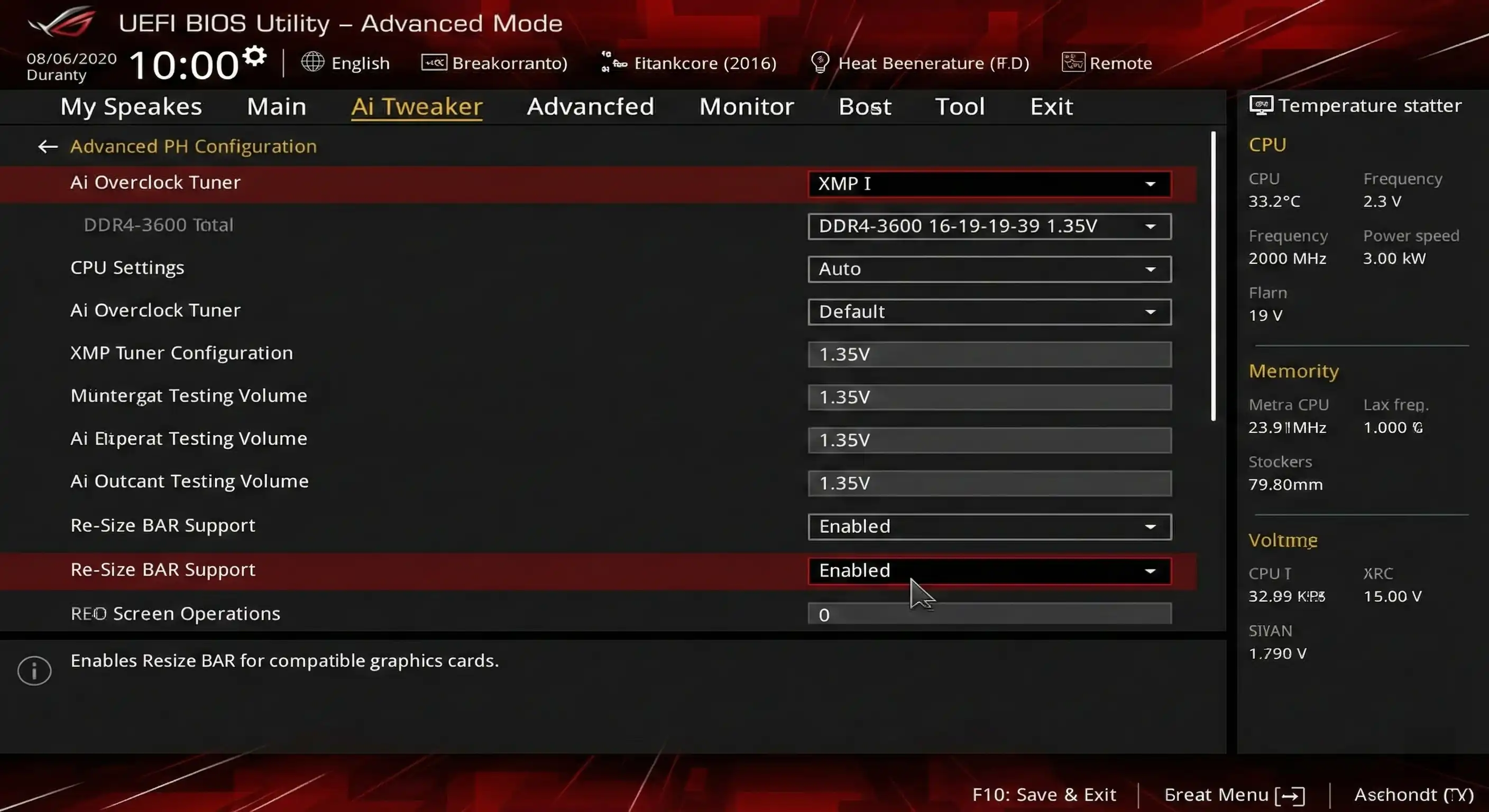
BIOS Settings: XMP and Re-Size BAR
It is shocking how many high-end PCs run at stock RAM speeds.
- Enable XMP/DOCP: Go into your BIOS. Turn XMP on. Running 6000MHz RAM at the default 4800MHz is like buying a Ferrari and driving in first gear. It hurts your 1% lows significantly.
- Enable Resizable BAR: This lets your CPU access the whole GPU frame buffer at once, not just tiny chunks. It smoothens out performance in modern titles.
Windows 10 vs. Windows 11 Gaming Tweaks
If you're on Windows 11, some security features hate your framerate.
- VBS & HVCI Impact: Virtualization-Based Security (VBS) eats performance. Tests show it can drop average frames by 5-10%, but the hit to 1% lows is worse—up to 29%.
- The Fix: If this is strictly a gaming rig, turn off "Core Isolation / Memory Integrity" in Windows Security.
- Game Mode: Leave Windows Game Mode ON. It stops Windows from deciding to install an update while you're in a boss fight.
- Update Check (Win 11 24H2): If you're on the 24H2 update, make sure you have the KB5058499 patch (or newer). Early versions had a bug that caused micro stutters. Microsoft fixed it, but you need the patch.
CPU Core Scheduling (Intel E-Cores Issue)
Running an Intel 12th, 13th, or 14th Gen? The hybrid architecture might be the villain. You have P-Cores (Power) and E-Cores (Efficiency). Sometimes, Windows gets confused and puts a heavy game thread on a weak E-Core, leading to High-End PC Stutter.
- The Symptoms: Games like Star Citizen or Cyberpunk 2077 stutter randomly.
- The Fix: Update your BIOS. If that fails, use Process Lasso. You can force the game to run only on P-Cores. Or, just disable E-Cores in BIOS to test if they are the problem.
Advanced Graphics & Display Settings
Sync Technologies: G-Sync, FreeSync, and V-Sync
Tearing looks bad. But traditional V-Sync adds input lag and stutter if you drop a single frame.
The Golden Rule for Smoothness:
- G-Sync / FreeSync: ON (In your driver panel).
- V-Sync: ON (In the Nvidia/AMD Control Panel). OFF in the game settings.
- Cap your Frame Rate: 3 FPS below your monitor's max (e.g., 141 FPS for a 144Hz screen).
This configuration, recommended by experts like Blur Busters, keeps G-Sync active 100% of the time. You get no tearing and no V-Sync stutter penalty.
Driver-Level Latency Reduction
- NVIDIA Reflex / AMD Anti-Lag: Turn these on. They sync the CPU and GPU queues perfectly. It makes the game feel snappier.
- Shader Cache Reset: Weird game stuttering high fps issues after a driver update? Old shader caches might be conflicting. Navigate to
%LocalAppData%\NVIDIA\DXCache(for NVIDIA) and delete everything. It forces the PC to build fresh, clean shaders.
Hardware Checks: When Components Are to Blame
The SSD Factor
Are you really running open-world games off an old HDD? Or a cheap SATA SSD? Modern games stream assets instantly. If the drive is slow, the engine pauses to wait for the data.
- Real Talk: Move GTA V or Cyberpunk to an NVMe SSD. The traversal stutters usually vanish.
- DirectStorage: Make sure you're using an NVMe drive to utilize DirectStorage technology. It bypasses CPU overhead for faster loading.
The "High Polling Rate" Mouse Trap
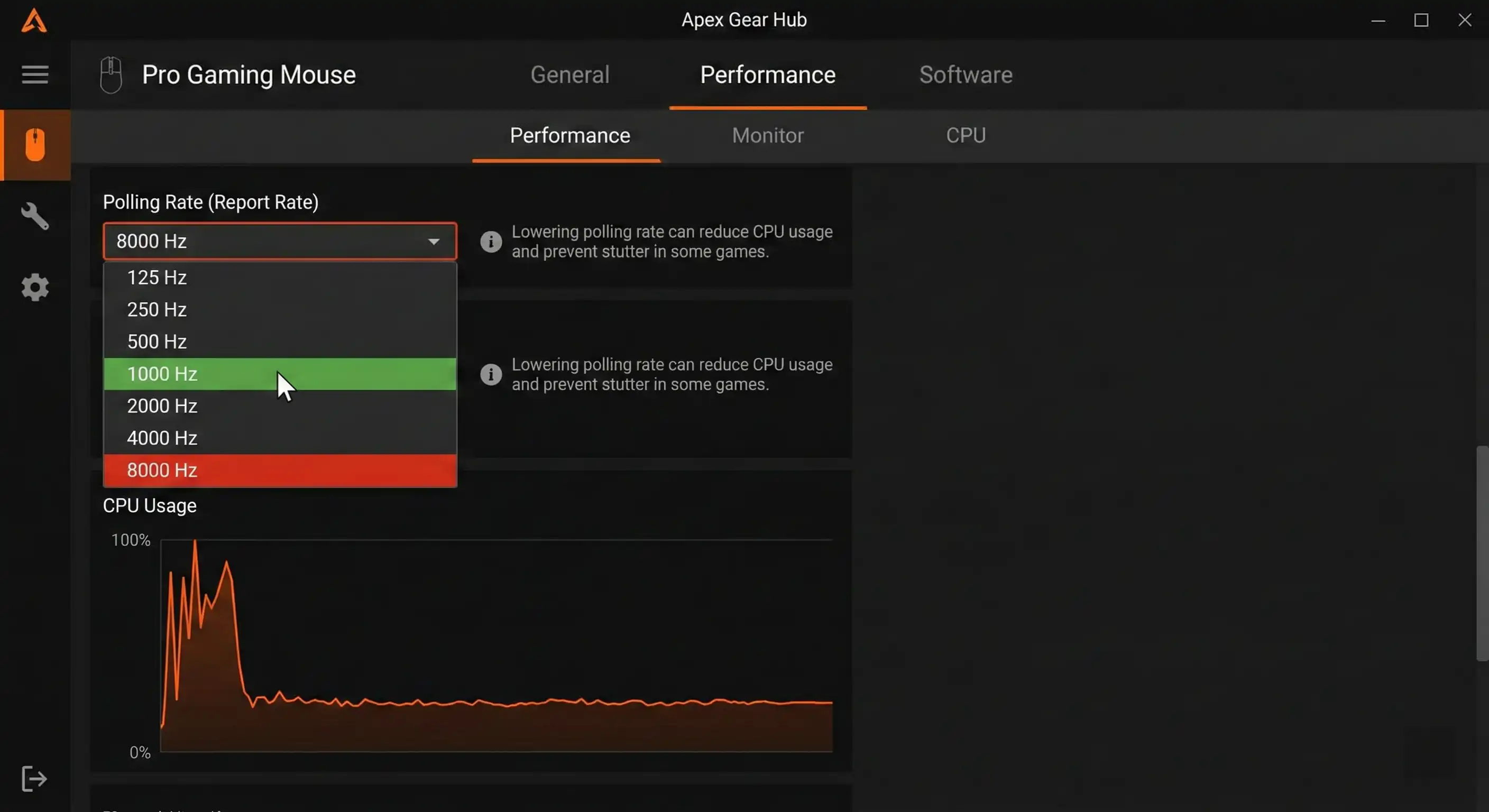
Here is a trap for enthusiasts. Did you buy a mouse with 4000Hz or 8000Hz polling? Sure, low latency is great. But sending 8,000 signals a second floods your CPU.
- The Issue: You move the mouse, FPS tanks. The CPU is too busy talking to the mouse to render the game.
- The Fix: Drop the polling rate to 1000Hz. If the High-End PC Stutter stops, you found your problem.
Power Supply (PSU) Stability
High-end GPUs (RTX 30/40 series) have "transient power spikes." They sip power, then gulp it for a split second. If your PSU is old or weak, it panics. It can't deliver stable voltage, so the GPU downclocks to save itself. That drop? That's your stutter.
Conclusion
Solving High-End PC Stutter isn't about one magic button. It's about finding the bottleneck in the pipeline between your hardware and your eyes.
Your Action Checklist:
- Diagnose: Watch the Frametime graph, not the FPS counter.
- Optimize: Turn on XMP and Resizable BAR. Kill VBS in Windows.
- Stabilize: Set up G-Sync with a frame cap. Check your mouse polling.
- Verify: Keep games on P-Cores and fast NVMe SSDs.
Don't let micro-stutters ruin a $3000 experience. Download monitoring tools and see what's really happening under the hood.
Fixed a stubborn stutter on your rig? Tell us your specs and what actually worked in the comments.
Frequently Asked Questions
Why does my High-End PC stutter in games even with high FPS?
This is often due to bad frame pacing. Even if the average speed is fast, if the gap between frames is inconsistent (one takes 5ms, the next takes 50ms), it results in High-End PC Stutter. Monitoring your "1% low FPS" will reveal this issue better than average FPS.
How do I fix micro stuttering in games?
To fix micro stuttering, cap your frame rate slightly below your monitor's refresh rate (e.g., 141 FPS on a 144Hz screen) and turn on G-Sync/FreeSync. Additionally, ensure your mouse polling rate is set to 1000Hz rather than 4000Hz+ to reduce CPU load.
Can a bad power supply cause PC stuttering?
Yes. If the PSU can't handle sudden power spikes from high-end GPUs, the card will momentarily slow down (downclock) to prevent a system crash. That split-second slowdown is felt as a stutter in demanding games.
Is V-Sync causing my game lag?
Traditional V-Sync can cause input lag and stuttering if your FPS drops below the monitor's refresh rate. The best practice is to enable G-Sync or FreeSync compatible mode and limit your FPS, rather than using standard V-Sync in-game.
Does RAM speed affect stuttering?
100%. Slow RAM—or forgetting to turn on XMP in BIOS—hurts your "1% Low FPS" significantly. Enabling XMP allows data to flow faster to the CPU, reducing bottlenecks that cause game stuttering in busy areas.
How to check frame time in games?
Download and install MSI Afterburner. In the settings menu under "Monitoring," select "Frametime" and check "Show in On-Screen Display." A flat line indicates smooth performance, while spikes indicate stutter.
Why do games stutter on my SSD?
If your SSD is full, performance drops. Keep 10-20% space free. Also, ensure you are using a fast NVMe drive rather than an older SATA SSD, as modern games require high-speed asset streaming to prevent traversal stutters.